> ## Documentation Index
> Fetch the complete documentation index at: https://docs.zelinqa.ai/llms.txt
> Use this file to discover all available pages before exploring further.
# Dashboard
> Monitor your NBQ Engine usage, billing, conversation volume, and question performance.
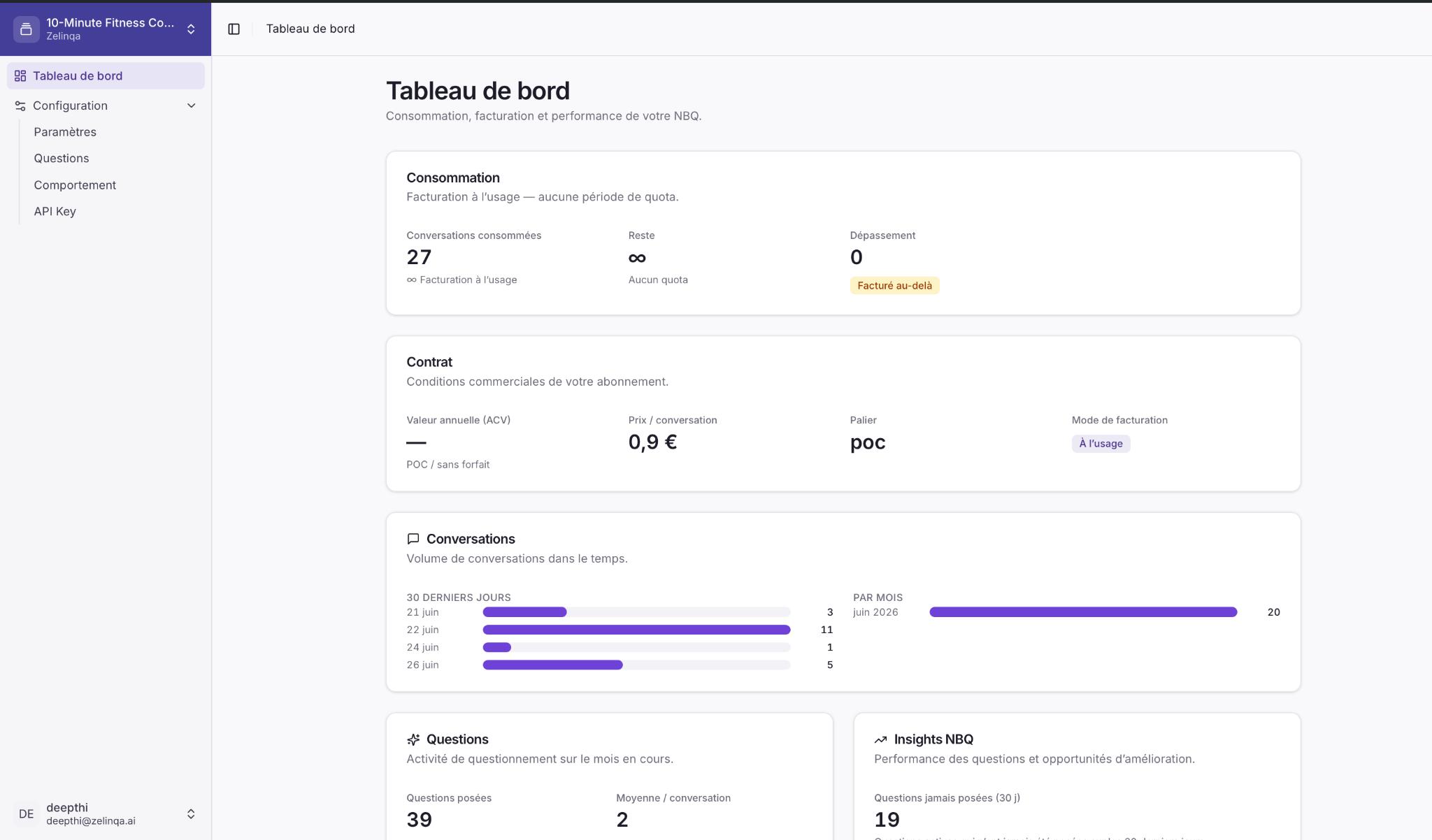
The **Dashboard** (Tableau de bord) gives you a real-time view of everything happening in your NBQ instance — consumption, contract terms, conversation activity, and which questions are driving results.
 ## Consommation
The **Consommation** panel shows your current billing usage.
| Field | Description |
| ---------------------------- | ----------------------------------------------------------------------------------- |
| **Conversations consommées** | Total conversations processed since the billing period started. |
| **Reste** | Remaining conversations in your quota. Shows ∞ on pay-as-you-go plans with no cap. |
| **Dépassement** | Conversations beyond your quota. Billed at the overage rate on plans that allow it. |
The badge below the Dépassement value indicates how overages are handled — for example **Facturé au-delà** (billed beyond quota).
## Contrat
The **Contrat** panel summarises the commercial terms of your subscription.
| Field | Description |
| ------------------------- | --------------------------------------------------------------------------------------------------------- |
| **Valeur annuelle (ACV)** | Your annual contract value, or **POC / sans forfait** for proof-of-concept accounts without a fixed plan. |
| **Prix / conversation** | The per-conversation rate applied to your usage. |
| **Palier** | Your current pricing tier (e.g. `poc`, `starter`, `growth`). |
| **Mode de facturation** | How you are billed — **À l'usage** means pay-as-you-go with no fixed quota. |
## Conversations
The **Conversations** panel shows conversation volume over time.
* **30 derniers jours** — a bar chart of daily conversation counts for the last 30 days.
* **Par mois** — total conversations for the current calendar month.
Use this panel to spot usage peaks, validate that your integration is live, and track growth over time.
## Questions
The **Questions** panel shows question activity for the current month.
| Metric | Description |
| -------------------------- | -------------------------------------------------------- |
| **Questions posées** | Total number of questions served to visitors this month. |
| **Moyenne / conversation** | Average number of questions asked per conversation. |
A low average may indicate the conversation is being cut short before NBQ has a chance to ask. A high average may indicate the engine has many eligible questions and the conversation is long.
## Insights NBQ
## Consommation
The **Consommation** panel shows your current billing usage.
| Field | Description |
| ---------------------------- | ----------------------------------------------------------------------------------- |
| **Conversations consommées** | Total conversations processed since the billing period started. |
| **Reste** | Remaining conversations in your quota. Shows ∞ on pay-as-you-go plans with no cap. |
| **Dépassement** | Conversations beyond your quota. Billed at the overage rate on plans that allow it. |
The badge below the Dépassement value indicates how overages are handled — for example **Facturé au-delà** (billed beyond quota).
## Contrat
The **Contrat** panel summarises the commercial terms of your subscription.
| Field | Description |
| ------------------------- | --------------------------------------------------------------------------------------------------------- |
| **Valeur annuelle (ACV)** | Your annual contract value, or **POC / sans forfait** for proof-of-concept accounts without a fixed plan. |
| **Prix / conversation** | The per-conversation rate applied to your usage. |
| **Palier** | Your current pricing tier (e.g. `poc`, `starter`, `growth`). |
| **Mode de facturation** | How you are billed — **À l'usage** means pay-as-you-go with no fixed quota. |
## Conversations
The **Conversations** panel shows conversation volume over time.
* **30 derniers jours** — a bar chart of daily conversation counts for the last 30 days.
* **Par mois** — total conversations for the current calendar month.
Use this panel to spot usage peaks, validate that your integration is live, and track growth over time.
## Questions
The **Questions** panel shows question activity for the current month.
| Metric | Description |
| -------------------------- | -------------------------------------------------------- |
| **Questions posées** | Total number of questions served to visitors this month. |
| **Moyenne / conversation** | Average number of questions asked per conversation. |
A low average may indicate the conversation is being cut short before NBQ has a chance to ask. A high average may indicate the engine has many eligible questions and the conversation is long.
## Insights NBQ
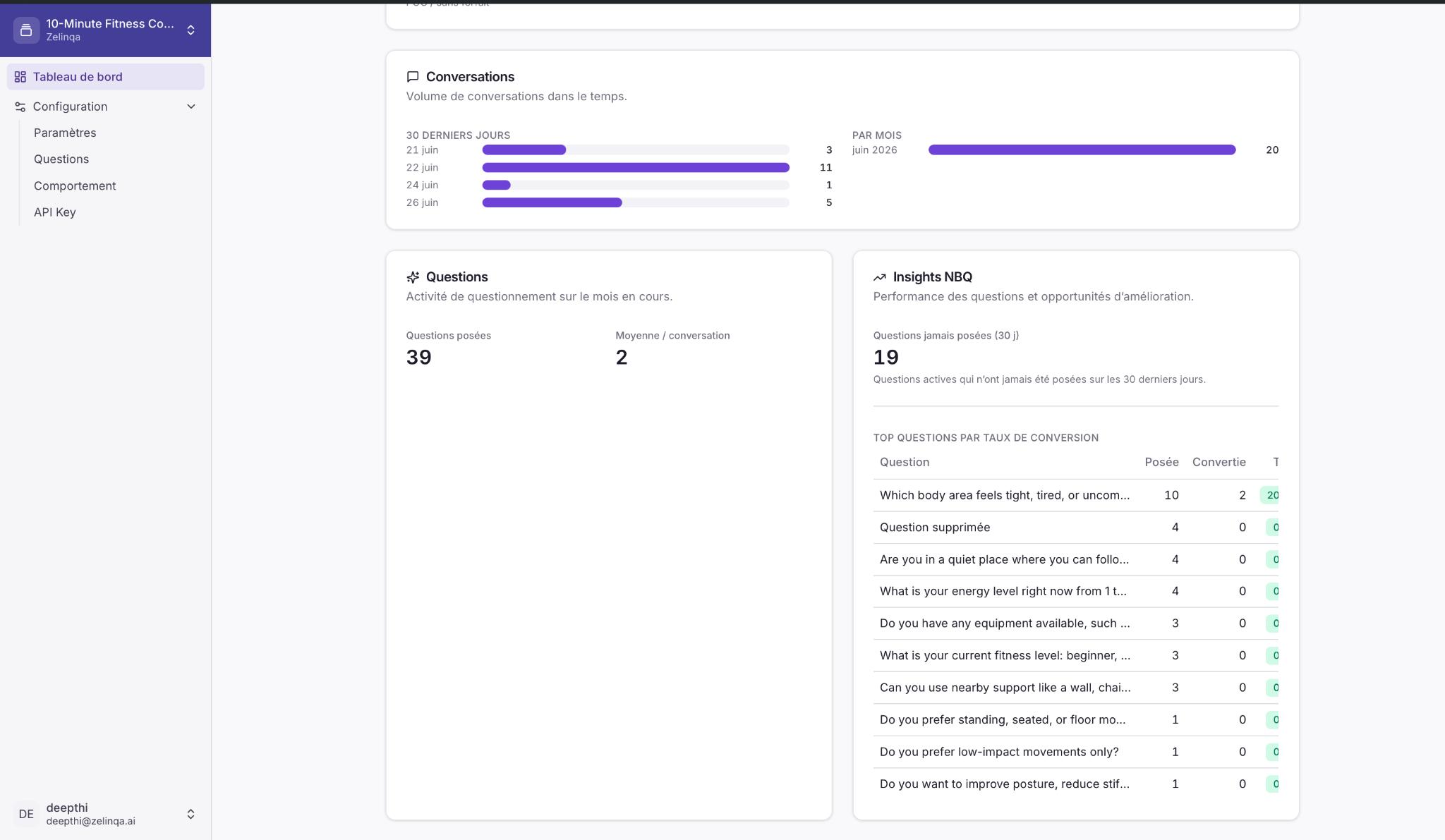 The **Insights NBQ** panel highlights performance opportunities.
### Questions jamais posées (30 j)
The count of **active questions that were never served** in the last 30 days. A high number here usually means:
* Those questions are in a low-priority category the engine rarely reaches, or
* The conversations are ending before those questions become relevant.
Review these questions in the **Questions** tab and consider adjusting category priority or deactivating questions that are no longer relevant.
### Top questions par taux de conversion
A ranked table of questions sorted by conversion rate — the percentage of conversations that reached a conversion after that question was asked.
| Column | Description |
| ------------- | ------------------------------------------------------------------ |
| **Question** | The question text (truncated). |
| **Posée** | How many times the question was served in the period. |
| **Convertie** | How many of those conversations resulted in a recorded conversion. |
| **Taux** | Conversion rate for that question. |
Questions at the top of this list are the ones most correlated with successful outcomes. Use this data to prioritise high-converting questions by moving their categories higher in the priority order.
The **Insights NBQ** panel highlights performance opportunities.
### Questions jamais posées (30 j)
The count of **active questions that were never served** in the last 30 days. A high number here usually means:
* Those questions are in a low-priority category the engine rarely reaches, or
* The conversations are ending before those questions become relevant.
Review these questions in the **Questions** tab and consider adjusting category priority or deactivating questions that are no longer relevant.
### Top questions par taux de conversion
A ranked table of questions sorted by conversion rate — the percentage of conversations that reached a conversion after that question was asked.
| Column | Description |
| ------------- | ------------------------------------------------------------------ |
| **Question** | The question text (truncated). |
| **Posée** | How many times the question was served in the period. |
| **Convertie** | How many of those conversations resulted in a recorded conversion. |
| **Taux** | Conversion rate for that question. |
Questions at the top of this list are the ones most correlated with successful outcomes. Use this data to prioritise high-converting questions by moving their categories higher in the priority order.